Side Quest: Firewalls?
I’m sure you’re reading this and thinking…if he’s really a Cyber Security expert, why on earth is there a question mark next to Firewalls. I’m sitting here and thinking…why did I do that? Well I think it’s a fun way to express how this felt as it was the first “Side Quest” in this series of quests. We’ve all been there, you’re following instructions whether it’s IKEA furniture or setting up an Elastic Cluster…there’s only 6 simple steps listed but you realize along the way that maybe you forgot to get a screw driver (step 3.1: find the right screwdriver) or you can’t find that one screw (step 4.6: don’t strip the screw). While initialing setting up the Elastic Cluster, I had a bunch of these and it makes the adventure even more…adventurous. I went into it thinking I would just:

As simple as apt-get install elastic, right? Well yeah, there’s elasticsearch, kibana, logstash…clearly there’s multiple components but why can’t it just be like “install here” and go. This is where Firewalls come in?
After installing Elasticsearch for the first time, I realized I couldn’t access it running on the localhost. After some quick googling (and some common sense), I realized that port 9200 was probably blocked as it’s the default port for Elasticsearch and my localhost (default port) was fine but when I tried hitting the specific port, it returned an error. My first thought was to check the default settings for networking at GCP and…..it looks fine:
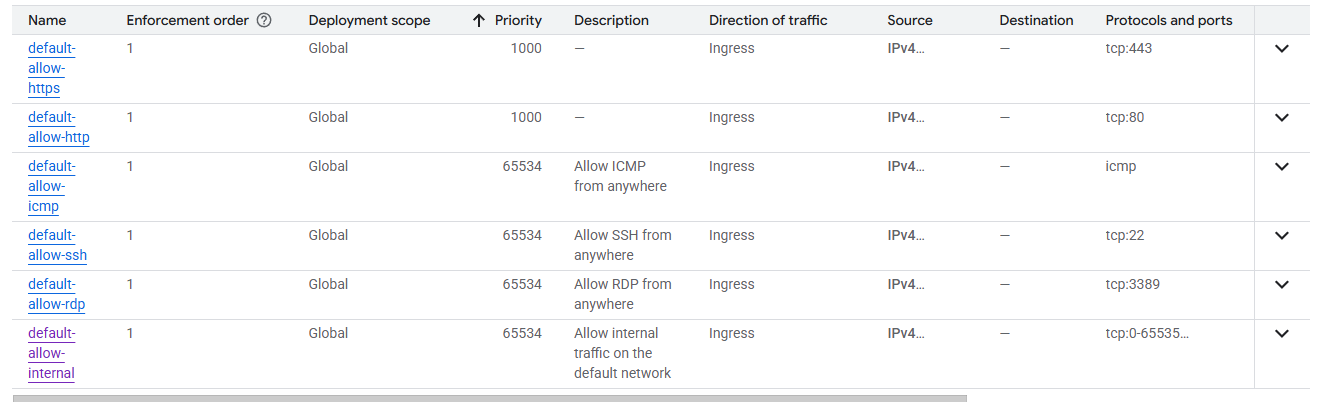
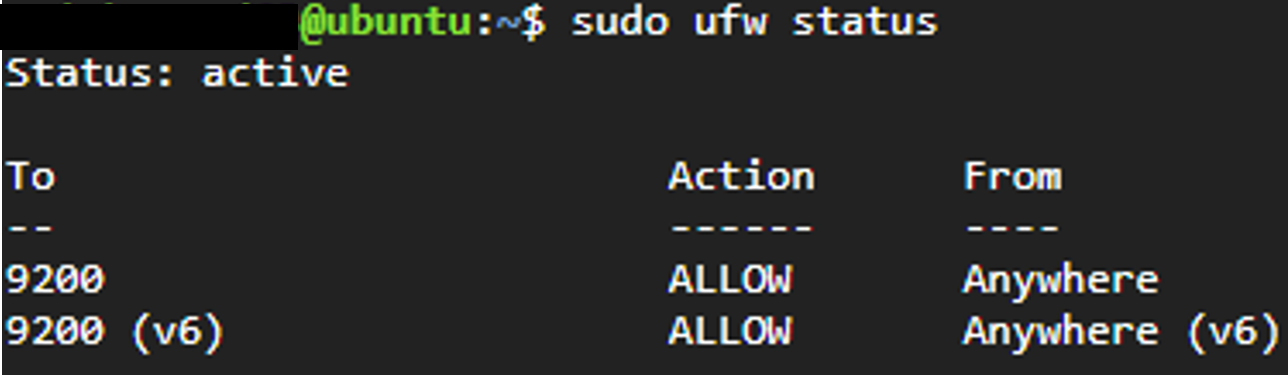
Firewall #1 checked…no dice. What’s next? Well we can check the Uncomplicated Firewall (UFW). It wasn’t enabled (duh) so I quickly enabled it so I have more control at the VM level rather than relying on GCP networking and allowed all traffic to port 9200. Still no dice…and now that I’ve enabled UFW, I need to configure it to allow SSH…great, more bloat.
Back to ufw disable.